How racing works
Last updated
Our race and practice servers run a race control system we built for Back 2 Pit. It watches track limits and contacts, hands out penalties and shows everything on a small in-game HUD, so you always know where you stand. This page explains the rules and what each message on screen means.
You need Custom Shaders Patch 0.2.0 or newer for the HUD. See Getting started if you have not installed it yet.
How a race night runs#
A race has three parts, all on the same server:
- Practice: a few minutes to warm up and check your car.
- Qualifying: your best lap sets your grid spot.
- Race: a standing start from the grid.
The times for each part are on the race page. Most of our races are timed (for example 20 minutes) rather than a set number of laps.
Joining late. You can join during practice and qualifying. If you connect after the server has switched to the race but before the green light, you start from the pit lane: the HUD shows PIT START and holds you in the pits until a few seconds after the start, with no penalty. Once the race is running, only drivers who were already on the server that evening, or who registered for the race, can get back in. So if your game crashes mid-race, rejoin straight away.
Track limits#
A cut is when three or more wheels are off the track for half a second or longer. A quick touch over the white line does not count. The HUD counts cuts live, so you see a +1 CUT popup the moment it happens.
What a cut costs depends on the session:
| Session | Cuts allowed | What happens on the next one |
|---|---|---|
| Practice | No limit | Nothing, but a lap with a cut does not count for lap records |
| Qualifying | 5 | Your best lap so far is deleted |
| Race | 5 | A drive-through penalty |
After a penalty the count starts again from zero, so 6 more cuts means another penalty.
Laps with cuts still count toward your race distance and time. They never count for lap records or the best lap shown in the results: only clean laps do.
Drive-through penalty#
When you get a drive-through, the HUD shows DRIVE-THROUGH and how many laps you have left to serve it. You have 3 laps.
To serve it, enter the pit lane, drive through it without stopping and leave at the other end. Keep to the pit speed limit (we allow 10 km/h over). The HUD shows DRIVE-THROUGH SERVED once it counts.
If you do not serve it within 3 laps, 30 seconds are added to your race time. The HUD shows +30 SECONDS.
Contacts#
Every contact with another car is counted and shows as a CONTACT popup with the impact speed. Hitting a wall does not count. Contacts do not give penalties during the race, but they lower your Safety Rating afterwards (see Series, points and ratings), and the stewards can look at them.
Jump starts#
Move before the green light and the server sends you back to the pits. The HUD shows JUMP START, then HELD IN PITS with a countdown, and you can leave 10 seconds after the green light. That is the whole penalty: you start from the pit lane behind everyone.
The final lap and the chequered flag#
In a timed race the clock runs down to zero, then the leader finishes their current lap and takes the chequered flag. Everyone else finishes the next time they cross the line, even if that means they drive one lap fewer than the leader.
On your HUD:
- When the leader has taken the flag, a LEADER HAS FINISHED card tells you this is your last lap, with your position and gap.
- The HUD shows FINAL LAP next to the race panel.
- When you cross the line, a CHEQUERED FLAG card shows your finishing position and gap. Slow down and drive back to the pits.
Laps driven after your own chequered flag do not count, so there is nothing to gain by staying out.
If you still have an unserved drive-through when you finish, your result is marked provisional and the 30 seconds are added.
Finishing and being classified#
To be classified you need at least 75% of the winner's laps. Being lapped is not a DNF: if the winner does 12 laps and you do 10, you are classified. If you leave early or retire and end up under 75%, you are not classified and score no points.
Results are published on the race page shortly after the race, then counted for series standings and ratings.
Splits#
A race has room for a set number of drivers per server, shown as Grid on the race page. If more drivers register than that, the race is split into more than one server when registration closes, 10 minutes before the start.
Splits are made by Elo rating, so drivers of a similar pace race together, and the splits are kept as even in size as possible. While registration is open, the race page shows which split you are likely to land in. Each split is a full race of its own, and its points count the same for the series.
The in-game HUD#
The race panel sits at the top of your screen. It has three parts:
- Track limits: your cuts so far against the limit (for example 3 / 5), and your total for the session. It turns orange one cut before the limit and red at the limit.
- Contacts: how many car contacts you have had.
- Penalties: CLEAN when you have none, otherwise the drive-through and laps left, the seconds added, or how many laps were deleted.
Messages you may see, and what they mean:
| On screen | Meaning |
|---|---|
| +1 CUT | You went over track limits |
| CONTACT 37 KM/H | You touched another car at that speed |
| DRIVE-THROUGH | You went over the cut limit in the race. Serve it within the laps shown |
| DRIVE-THROUGH SERVED | Your penalty is done |
| +30 SECONDS | You did not serve the drive-through in time |
| LAP DELETED | Qualifying only: your best lap no longer counts |
| JUMP START | You moved before the green light and were sent to the pits |
| PIT START | You joined after the grid formed and start from the pit lane |
| HELD IN PITS | Countdown until you may leave the pits |
| FINAL LAP | The leader has finished. This is your last lap |
| CHEQUERED FLAG | You finished, with your position |
On practice servers you may also see:
- NEW LAP RECORD! when you set a clean lap faster than the Back 2 Pit record for your car class on that track. It shows the old record and who held it.
- YOU'RE THE FASTEST! for the same thing when you have not signed up yet. Sign in with Steam on the site to claim the record, because laps are saved to your Steam ID.
- WELCOME TO BACK 2 PIT, a short reminder every so often for drivers who have not signed up yet.
Race control also posts penalties in the server chat, starting "[Race Control]".
How lap times are recorded#
Every clean lap you drive on our race and practice servers is saved to your profile and to the lap times board, from races, qualifying and practice alike.
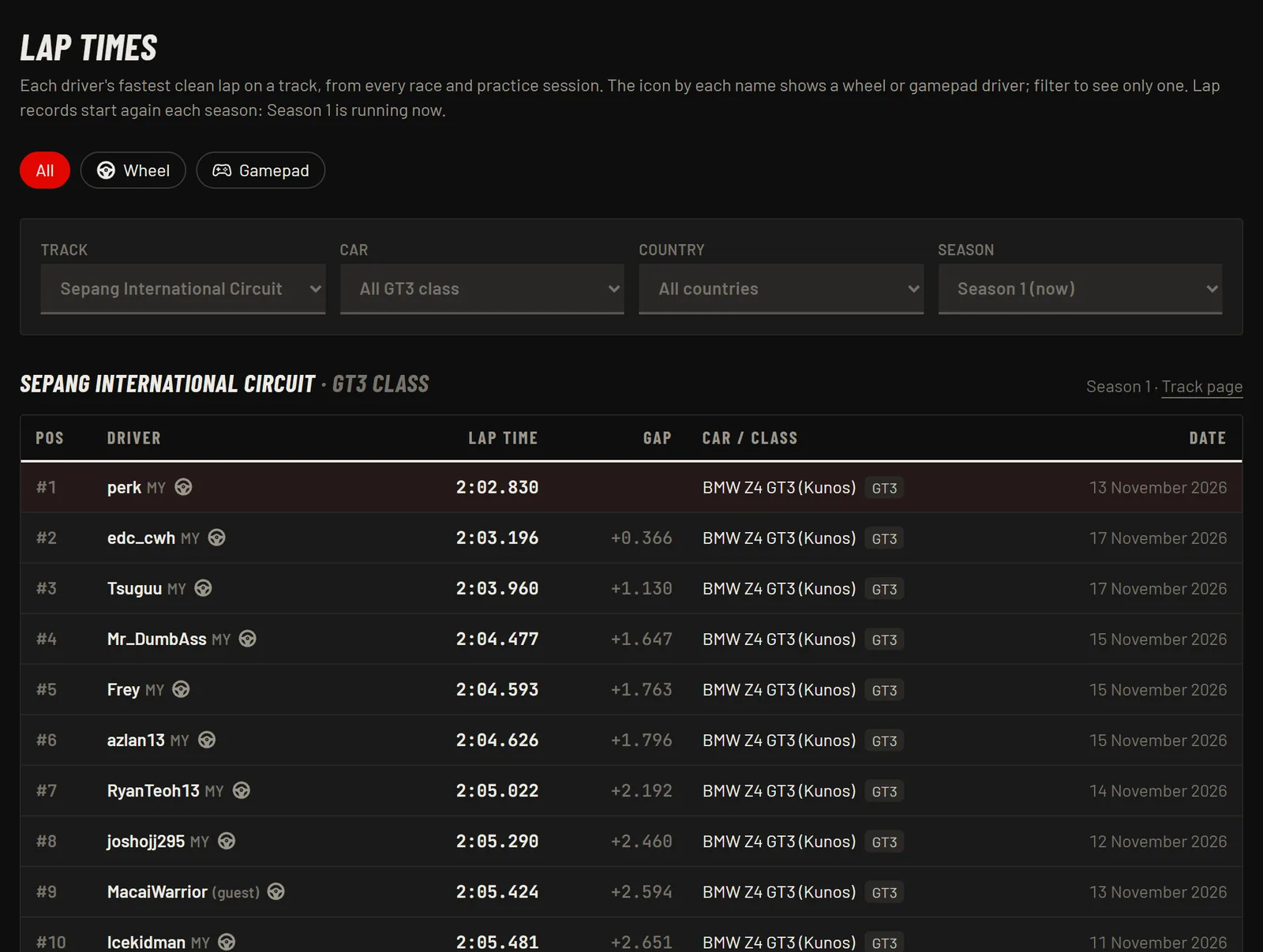
- Clean laps only. A lap with a cut never counts.
- Per track and car class. GT3 cars are compared with GT3 cars, Formula cars with Formula cars, and so on.
- Wheel or gamepad. We detect what you drive with. The board shows everyone by default, and you can filter to wheel or gamepad only.
- Seasons. Lap records run in seasons, and the season is shown on the board.
- Guests too. Laps by drivers without an account are kept against their Steam ID and move to their profile when they sign up.
- Fun races and test runs do not count for records, ratings or stats.
New lap records are also announced on our Discord.